

Vega Discover Features
Vega Discover offers a variety of tools for exploring the library’s online catalog.
Below are just some of the enhanced features that can be used to browse for items, refine search results, place holds, and log into the Patron Account Portal.
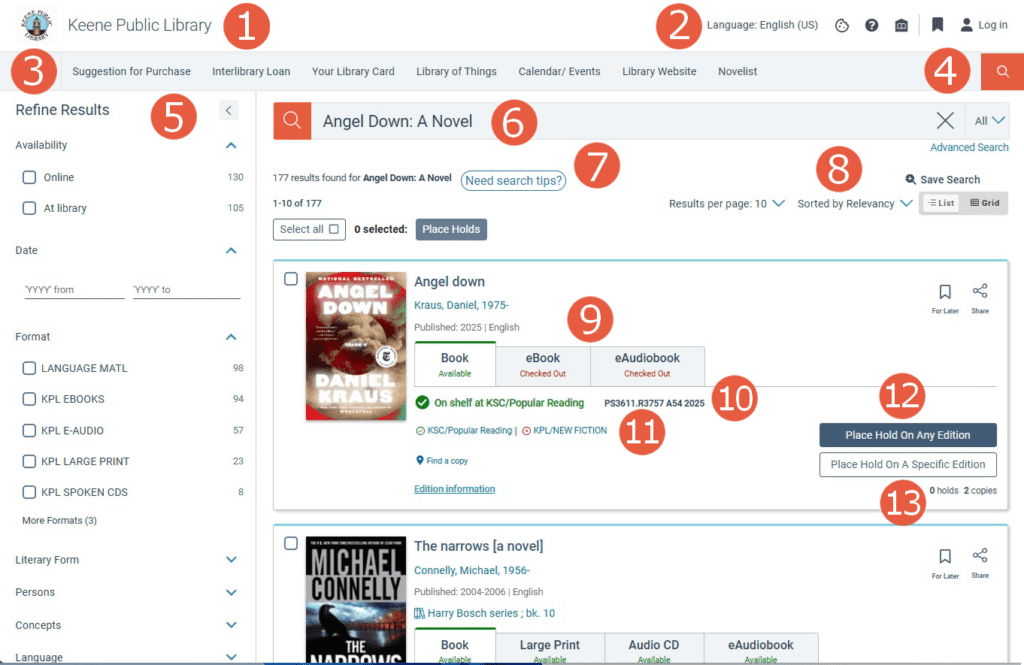
- Vega Discover Features
- Keene Public Library logo: click this button to visit the Vega Discover landing page
- Patron Toolbar: Includes language customization, help menu, and access to the Patron Account Portal
- Library Links Toolbar: Includes links to request forms, reservation platform, event calendar, and library website
- Search Bar: This search bar is available on every catalog page
- Refine Search Results: Use the facets below to limit your search by availability, format, concept (subject), collection, etc…
- Smart Search Bar: Where available, this search bar provides suggestions related to title, author, and concept (subject)
- Search Tip Button: Click this button to learn more about Vega Discover
- Search Result Controls: These tools allow you to view more items per page, sort results, and change the view
- Material Roll-up: Vega groups together all the formats of a title – print, large print, ebook, audiobook, and more
- On Shelf At…: Displays the first available copies’ call number
- Collection List: Displays each collection the item has been added to
- Hold Options: Place on a hold on the first available copy or a specific copy of the item
- Holds to Copies: Displays the number existing holds and number of copies owned